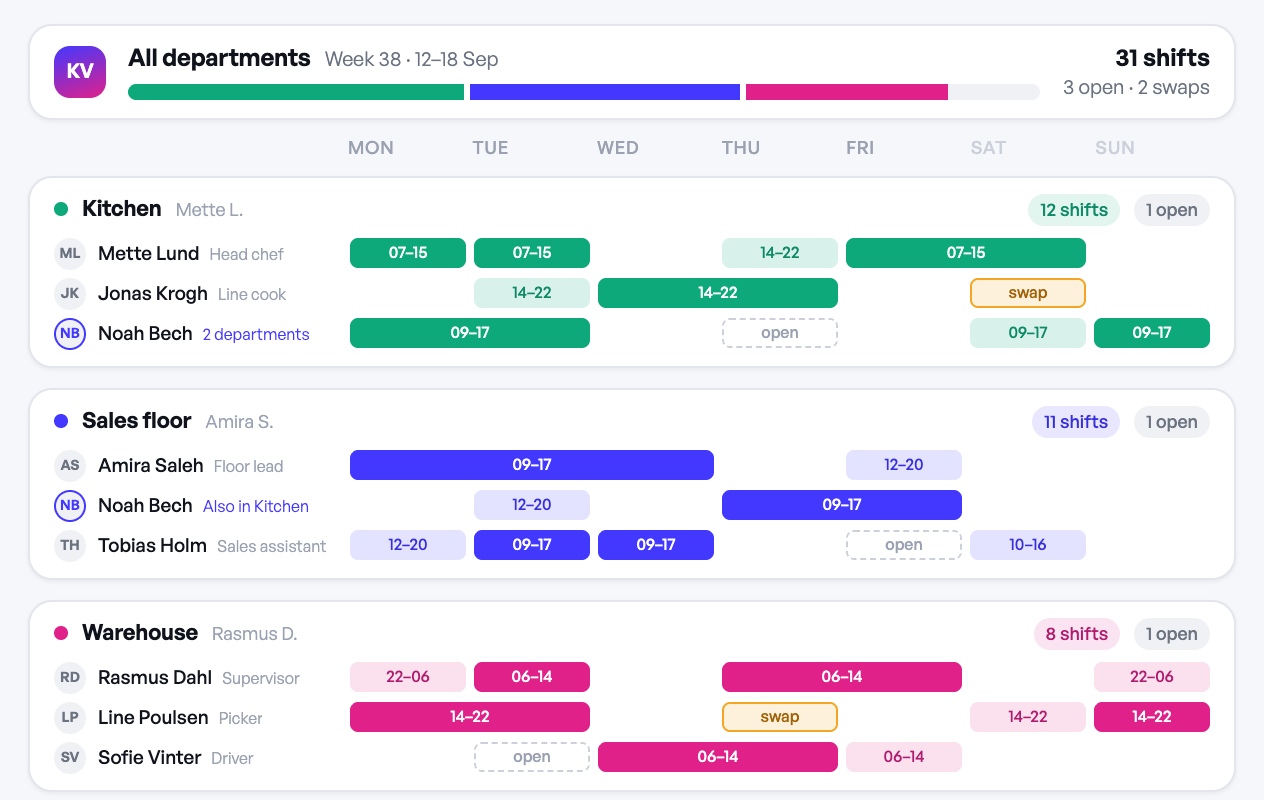
Once a business has more than one distinct team — front-of-house and kitchen, sales floor and stockroom, day shift and night shift, warehouse and delivery — scheduling by department stops being a nice-to-have and becomes the only way to avoid constant mistakes. The core idea is simple: each department gets its own schedule with its own rules, staff list, and shift patterns, but a manager or owner can still see everything from one place.
Why departments need separate schedules
Different departments rarely run on the same logic. A kitchen might need coverage in tight, overlapping shifts around meal service. A sales floor might need even coverage across opening hours with one person handling closing. A warehouse might run two fixed shifts with almost no variation week to week.
When you force all of this into one calendar, you get problems that have nothing to do with staffing and everything to do with layout:
- Managers scroll past 30 names to find the five people they actually schedule
- Shift patterns that make sense for one team look like errors when mixed with another team's pattern
- It's easy to accidentally assign someone to a shift in a department they don't work in
- Approving time off or swaps means checking who's even relevant to that request
Separating schedules by department removes this noise. A kitchen manager only sees kitchen shifts. A warehouse supervisor only sees warehouse shifts. Nobody has to mentally filter out the parts of the calendar that don't apply to them.
What "separate but visible" looks like in practice
The goal isn't to create silos — it's to give each department its own working view while keeping a company-wide picture intact for whoever needs it. In practice that means:
- Each department has its own shift patterns and repeat-forward templates, since a kitchen's weekly rhythm rarely matches a stockroom's.
- Department managers get edit access to their own team's schedule, not everyone else's.
- Owners or regional managers can see across all departments at once, for coverage checks, labor cost totals, or spotting a department that's short-staffed.
- Employees who work across two departments (a common case in smaller businesses) are visible on both schedules without being duplicated as separate people in the system.
- Approvals — time off, swap requests — route to the manager of the relevant department, not to one central inbox that has to figure out who owns what.
This is one of the reasons multi-department support matters more than it looks like on paper: it's not about adding a filter to a big calendar, it's about giving each team a schedule that behaves like their team's schedule, while someone still has the full picture.
Signs you've outgrown a single schedule
If any of these sound familiar, it's worth splitting by department now rather than after a bigger scheduling mistake:
- You've double-booked someone across two roles because the calendar didn't make it obvious
- New managers need a walkthrough just to find their own team's shifts
- Time-off approvals get delayed because the request landed in front of the wrong manager
- You're copying the same weekly pattern into a new department manually instead of it being separate to begin with
- Reporting on hours or labor cost per department means exporting everything and filtering by hand
None of these are staffing problems — they're structure problems. Fixing the structure usually takes less effort than it seems, and it pays off every single week afterward, not just once.